Progress Desk for Mac & Windows
The complete workspace for goals, scheduling, documents, and service minutes.
$99 one time
- One license for up to 2 computers
- macOS 12+ · Windows 10+
- 14-day free trial, no card needed
- 30-day money-back guarantee
 ProgressDesk
Built for special education case managers
Your IEP caseload, finally in one place. Track goals, plan your week, and turn the data you already collect into the reports you need.
Mac & Windows · 14 days · No credit card · No account to create
FROM MONDAY MORNING TO PROGRESS REPORTS
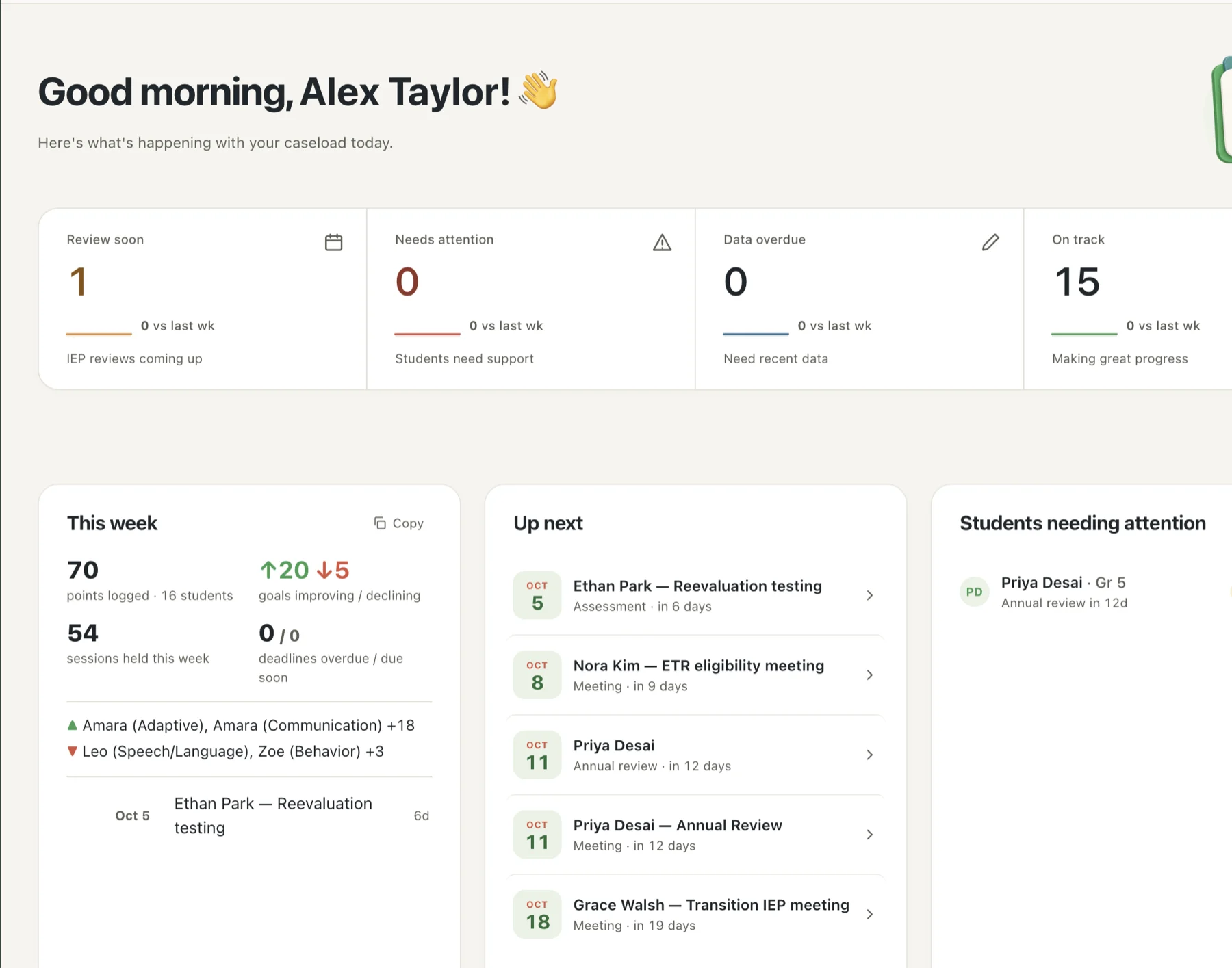
Start with what needs your attention. Keep the details connected as your day moves forward.
Upcoming reviews, goals that need attention, and service minutes — all in one overview. Start the day with a clear picture of your caseload.
Log a probe in seconds and see the trend against the goal — not a spreadsheet you have to decode later. Goals that stall get flagged before the quarter ends.
See how data becomes a reportBuild your schedule once and see delivered service minutes against each student’s IEP, week by week — so the numbers are ready before anyone asks for them.
LESS RE-ENTERING. MORE TEACHING.
Turn the work you’ve logged into PLAAFPs, quarterly progress reports, family summaries, and more. Start from your records instead of a blank page.
PRIVATE BY DESIGN
Progress Desk stores your records on your device. On Mac and Windows, the caseload file is encrypted and tied to your login — with optional Touch ID on Mac for another layer of protection.
Read the privacy detailsOpen the app and get to work.
Your student records stay local, encrypted at rest.
Your work isn’t someone else’s analytics.
Desktop license activation uses an internet connection once to check your key and device code. After activation, you can work offline.
A TOOL YOU OWN
No subscription. No account. Free updates for the major version you buy.
The complete workspace for goals, scheduling, documents, and service minutes.
Bring your caseload to the table. Capture data points and session notes as they happen.
A FEW PRACTICAL DETAILS
Still have a question? The help center has setup guides and a way to reach a human.
Visit the help centerYes. The Mac and Windows apps have a 14-day free trial with no credit card and no account required. Choose your platform in the pricing section above.
No. The desktop app is $99 for up to two computers, on Mac or Windows. The iPad companion is a separate $59 purchase per iPad, available on the App Store.
The desktop app checks your license key and device code during activation. After that, it can work offline. Student records stay local.
Your one-time purchase includes free updates for the major version you buy.
Visit the getting-started guide or the help center for setup and support.
MAKE ROOM FOR THE WORK THAT MATTERS
Download the trial, open your caseload, and see your week in one place before the next IEP meeting.